Buy Box on Amazon Vendor: How to Catch a Lost Position in Time
Losing the Buy Box on a Vendor account almost never starts with a price hike. It starts with a reseller shaving a little off theirs, or a stock gap that lasts a couple of days. By the time someone notices in the weekly sales report, the product has already been underselling for a while.
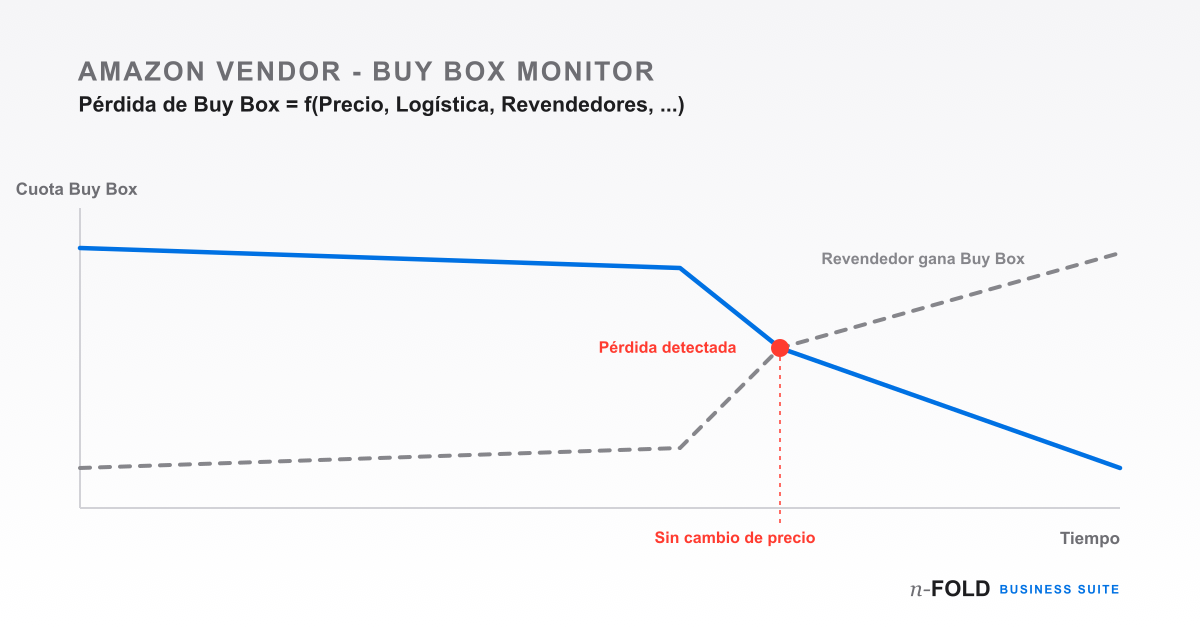
If you sell to Amazon as a direct supplier, it's tempting to assume that, since you're the one supplying the product, the Buy Box is automatically yours. It isn't. On Vendor Central, Amazon resells your catalogue at retail, but any authorised reseller — and occasionally one that isn't — can list the same ASIN through Seller Central and compete for that same slot. Most of the time Amazon wins on price and availability. Not always.
What the Buy Box actually is on a Vendor account
The Buy Box is the "Add to Cart" button on the product page. When several sellers offer the same ASIN, only one holds that button at any given moment; the rest get pushed to a secondary "See other buying options" link that most shoppers never click. Losing the Buy Box doesn't mean your listing disappears — it means it stops selling, even though it's technically still live.
The usual causes, and none of them is "raising the price"
When a brand digs into why a specific ASIN lost the Buy Box, it almost always finds one of these:
- Unauthorised resellers sourcing stock through other channels and listing it cheaper — sometimes below your own wholesale price.
- No available stock at Amazon's warehouse — even with units in transit, if there's no inventory ready to ship today, the Buy Box can shift to a seller with physical stock.
- Fulfilment fee changes that alter the total price (sale + shipping) Amazon uses to compare offers, without you touching the sale price.
- Shipping or compliance incidents that temporarily affect your offer's eligibility to win the Buy Box.
Why it's hard to catch in time
Vendor Central doesn't send an alert when an ASIN loses the Buy Box. The information exists, but you have to go and find it listing by listing, and across a catalogue of several hundred SKUs that's not something you can do daily. In practice, most teams find out indirectly — checking the weekly sales report and noticing a product that always used to sell well suddenly isn't. By then, days — sometimes weeks — of lost sales have already gone by with nobody knowing why.
What to watch beyond price
Price is the most visible variable, but not the only one worth tracking. Market share per ASIN — what percentage of the time you hold the Buy Box against other sellers — tells a different story than a simple "you have it today, you don't tomorrow." An ASIN can lose the Buy Box briefly without it being a concern, or it can be losing it consistently for weeks without anyone having cross-referenced that against the corresponding sales dip. Watching the trend over time, not just the current snapshot, is what lets you tell an isolated incident apart from a structural problem.
Automating the tracking without checking the panel every day
The alternative to manually reviewing listing by listing is automating the tracking. n-FOLD Business Suite's seller analytics module syncs Buy Box status and market share per ASIN via SP-API, and flags a product losing position — without anyone having to check every morning. The difference isn't just convenience: it's the ability to react the same day it happens, instead of finding out at the end of the week.
Managing several ASINs or Amazon Vendor accounts and want to track the Buy Box without checking the panel daily?
See the Amazon Vendor moduleThis tracking runs on the same data as the demand forecasting that Business Suite already syncs. If you want to see how it compares with managing everything manually from Vendor Central, check out the detailed comparison.