Demand Forecasting in Amazon Vendor Central: How to Read Brand Analytics
Vendor Central shows you a demand forecast per ASIN. It doesn't tell you how much to order, when, or what to do if you already have stock on the way. Someone on your team still has to decide that, usually by hand.
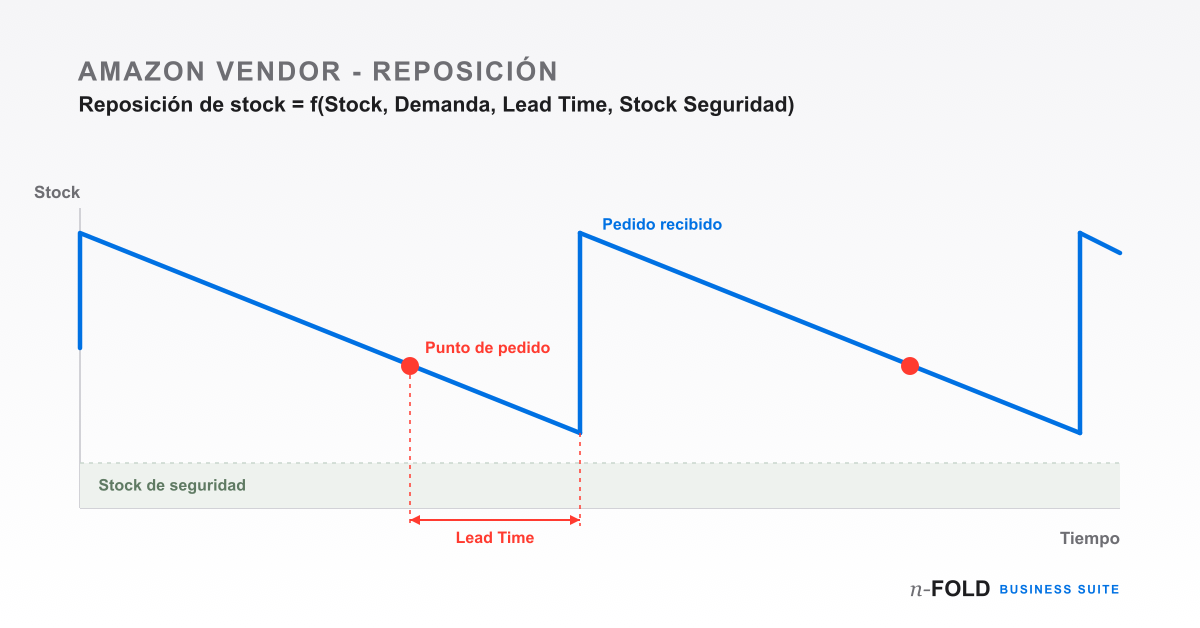
If you run an Amazon Vendor account, you probably already check Brand Analytics from time to time. The data is there, updated, broken down by ASIN. And yet most teams we've talked to end up doing the same thing: export the report, cross-reference it by hand against the purchase order spreadsheet, and eyeball next week's order quantity. It works — until the catalogue grows a bit and the whole thing stops being sustainable.
What's actually behind Brand Analytics
Amazon's forecast is built from sales history, search trends and purchasing behaviour on the platform, and it's generally reasonably reliable. The issue isn't its quality — it's that it arrives disconnected from everything else. It doesn't know how much stock you're holding today, doesn't know which purchase orders you've already sent that are still in transit, and certainly doesn't know your real lead time with the manufacturer. Two brands can get the exact same forecast for the same ASIN and need opposite replenishment decisions, simply because one has three weeks of stock sitting in an Amazon fulfilment centre and the other has none.
The two mistakes that keep happening
When the forecast is read on its own, without cross-referencing it against the rest of the operation, you tend to land on one of two problems. A stockout shows up when a demand spike the forecast hadn't fully anticipated hits — a promotion, a seasonal campaign — and the replenishment order goes out too late. Overstock is the opposite problem: an order gets placed against an optimistic forecast without first checking the units already in transit, and the result is excess inventory racking up storage fees at Amazon's fulfilment centres. In both cases the underlying cause is usually the same — nobody's looking at the forecast alongside the rest of the variables at the same time.
What actually goes into a good replenishment decision
The demand forecast is the starting point, but on its own it isn't enough. Before placing an order, a purchasing team that does this well checks five things:
- Actual sales in the catalogue. They don't always match what Amazon predicted — worth checking before trusting the forecast.
- Purchase orders already in transit. Which POs are still on their way, so you're not duplicating units that are going to land anyway.
- Real lead time with the manufacturer. The time your supply chain actually takes, not the one on the supplier sheet.
- Desired stock coverage. The safety buffer you want to hold per ASIN.
- Known upcoming events. Promotions or campaigns that historical data hasn't caught up with yet.
None of this replaces the purchasing team's judgement; what it does is give that judgement a consistent base to work from when there are a couple of hundred ASINs to review each week, not five.
Why spreadsheets stop working past a certain size
Most teams start out managing this in spreadsheets, manually cross-referencing reports exported from Vendor Central. With a small catalogue, that's reasonable. The trouble starts when you have to repeat that cross-check every week across a large catalogue: reports go stale the moment they're exported, open purchase orders are easy to lose track of, and catching a demand spike ahead of a campaign means going through the entire catalogue by hand, ASIN by ASIN.
Automating the cross-check without losing control of the decision
The alternative isn't to stop looking at the data — it's to stop cross-referencing it by hand. That's what the Amazon Vendor module in n-FOLD Business Suite does: it syncs forecasts, sales, open purchase orders and inventory via SP-API, and turns all of it into a recommendation of quantity and optimal order timing per ASIN — with visual alerts as a product approaches a stockout.
Managing several ASINs or Amazon Vendor accounts and want to automate replenishment?
See the Amazon Vendor moduleIf you want to go deeper into how Business Suite compares with managing everything manually from Vendor Central, check out the detailed comparison, or read about another common issue on Vendor accounts: how to catch a lost Buy Box in time.